
Multiplier on the fly - under the Linux
We introduce the software which enables multiplier change of the Athlon XP-M processors in the linux.
However, since following software is development stages, it does not necessarily operate correctly.
For changing the Multiplier under the Linux
About k7mctrl
This command can perform change of FID and VID, and displays it.
For displaying VID and FID.
Input the command of k7mctrl.
> k7mctrl
Max     VID: 0B(1.575V, 1.450V)
Start   VID: 0B(1.575V, 1.450V)
Current VID: 10(1.450V, 1.275V)
Max     FID: 16(14.0x)
Start   FID: 06(6.0x)
Current FID: 10(3.0x)
For changing the multiplier.
Add the -fid option.
> k7mctrl -fid 8.0
FID: 0A(8.0x)
For changing the core voltage.
Add the -vid option.
> k7mctrl -vid 1.35
VID: 0D(1.525V, 1.350V)
Attention: It is displayed as if it has changed. However, an actual value is not changed except for Laptop PC.
tkK7mauto
This software has the function to change the multiplier of Athlon XP-M in the GUI environment.
In Auto mode, this tool detects the load of CPU and changes the frequency automatically. In manual mode, frequency changes by movement of the slider. However, movement of core voltage and a fan's slider is invalid.
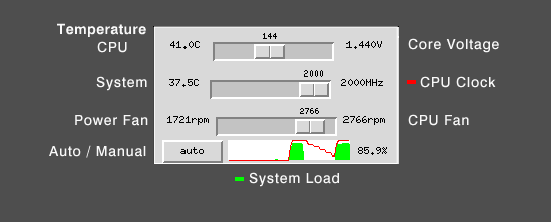
Attention: A fan's frequency and the temperature of CPU may be the displays for AK77-600N, and may not be correctly displayed in the other system.
The environment in the test is the following.
- OS : Debian GNU/Linux (kernel 2.6.7)
- M/B: AOpen AK77-600N
- CPU: AMD Athlon XP-M 2500+
For getting these software
- Attention
- Since such software is a development stage, it does not necessarily operate correctly. And it has not judged whether CPU is XP-M, please do not use such software to Athlon XP.
- Please try on your own risk.
- daitei's home page (Japanese)
k7mctrl, tkK7mauto -
This software can be distributed according to the provision which GNU GENERAL PUBLIC LICENSE Version 2 defines. - Download
- k7mctrl-0.2a.tar.gz
- k7mctrl-0.4a.tar.gz updated on(05/25/2007) Debian GNU/Linux (etch) kernel 2.6.18
- Updated on 05/10/2007
- Introduced 10/09/2004
